Skip to main content




New Project November: Makey Makey Arcade Buttons


Plug and Play
Once your buttons are all wired up, you are ready to plug and play with our new apps! (Or you can code your own project in Scratch!)

To celebrate the launch of our new Craft + Code Booster Kit and Get Up + Go Booster Kit, we have also launched new apps that will let you have a full plug-and-play Makey Makey experience with any invention!
 Craft and Code Booster Kit |
 Get up + Go! Booster Kit |
The NEW Makey Makey Piano App
The new Makey Makey Piano App is the culmination of years of learning and play at JoyLabz. We took our tried-and-true piano app that was created when Makey Makey was first introduced, and we took it up a level. The new Piano App has a number of cool features we think you'll like!
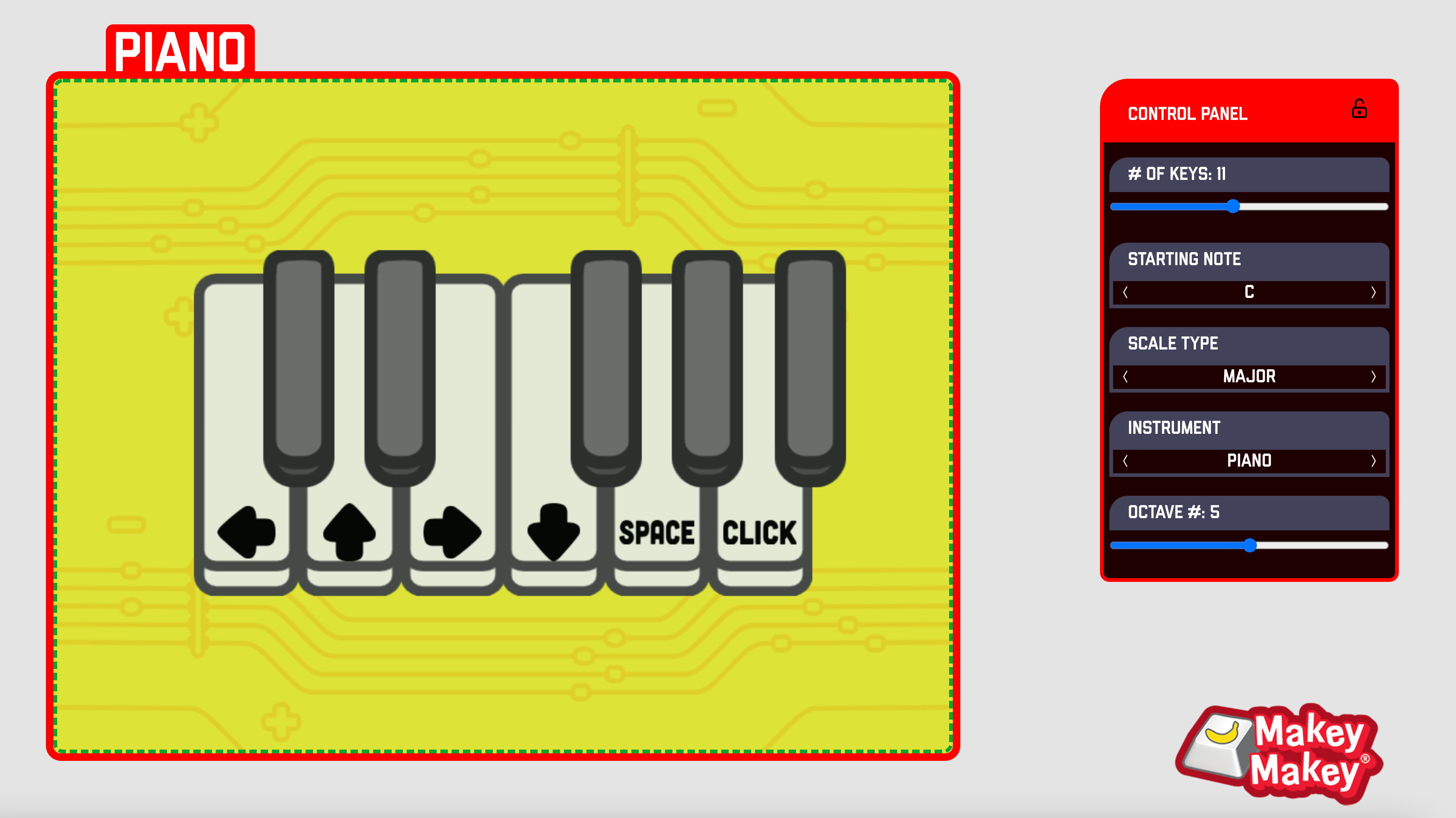
New Piano App Features
- Selectable Instruments : Yes! You can choose from a number of different instruments now instead of just a piano. Why not a trumpet piano? Piccolo?
- Octave Choice : Adjust this slider to pick the octave you want to play music in.
- Number of Piano Keys : Want more keys? Or less? You can change the number of keys on your piano by adjusting this slider.
- Scale and Starting Note : Want to start with a different note? Not a problem!
- Want to use different key presses? Select the piano key and adjust to a different key press in the control panel.

We designed the new Piano App to give you more flexibility when building musical instruments with the Makey Makey. We wanted an app that still works with Makey Makey right out of the box and that inspires you to jam out and to create an entire band of Makey Makey instruments.
We just made designing your own musical instrument even easier!
 |
Makey Makey Counter

One of our favorite Makey Makey projects is this exit ticket / data collector project. Now you can focus on building your physical device and use our new Makey Makey Counter App for plug-and-play functionality right away!

Need more buttons? Want to use different inputs? No problem! Just adjust the sliders in the control panel to make the Counter App do what you need.
Launch the Counter! |
Makey Makey Buzzer App
Want to make a Jeopardy-style quiz show for your classroom or maybe have a trivia night at home? With our new Buzzer App, you can easily build your own custom switches. Our app does all the work to see who buzzed in first!.

This app is designed to emulate a game show style buzz-in system. The “host” or leader of a game can “start” a session and then each individual participant can “buzz-in” by pressing the key assigned to them.
Just connect each button to the defined key for that participant in the Buzzer App and start buzzing in! Now you can be the next contestant in your own game show.

Go to Buzzer App! |
Share your ideas on social!
Share your own projects for a chance to be featured on our blog! Make sure to tag our account and use the hashtag #NewProjectNov
- Tik Tok
- Makey Makey Educators Group on Facebook
- Share your own how to guide on Instructables